plugin · open source · experimental

XivHud · Crafting
A workshop and a worklist.
Browse recipes and plan a session worklist with combined direct-material requirements.
development · independent Dalamud module and optional Umbra toolbar plugin. Offline builds and tests cover the host, content and toolbar adapters. See the recorded screenshots and repository acceptance notes for the live checks and remaining limits.
Open the window
Browse recipes and plan a session worklist with combined direct-material requirements. Use /xivcrafting or its optional Umbra.XivHud.Crafting toolbar button. Each module works without Umbra.
Independent floating presentation
Open /xivwindows, choose an open plugin window, then Float selected. Choose Follow me, View, Here or Ground. Screen returns one source; /xivwindows screen recovers all sources. Closing the host restores their ordinary screen rendering.
Development installation
The modules use the explicit development Dalamud repository. Umbra toolbar DLLs are separate assets in the same development release. Add the adapter DLL in Umbra Settings → Plugins, restart Umbra, then choose the widget in the toolbar editor.
What quantities mean
Worklists count crafts, not output items. Shared direct ingredients are combined before comparing usable NQ + HQ stock in four carried bags. Partial bag scans and crystal quantities show unknown. Collectables are excluded from usable stock. Recipe eligibility, subrecipes and synthesis execution remain in the native crafting log.
Install and build
Add https://spacegho.st/mods/ffxiv/plugins.json in Dalamud’s Experimental settings and enable plugin testing builds. These are experimental builds. The installation page explains the repository and the build-it-yourself path.
Dalamud API 15. The game module provides data and input; the optional Umbra plugin adds its toolbar button.
Build instructions and verification records are in the project README.
Screenshots and captures
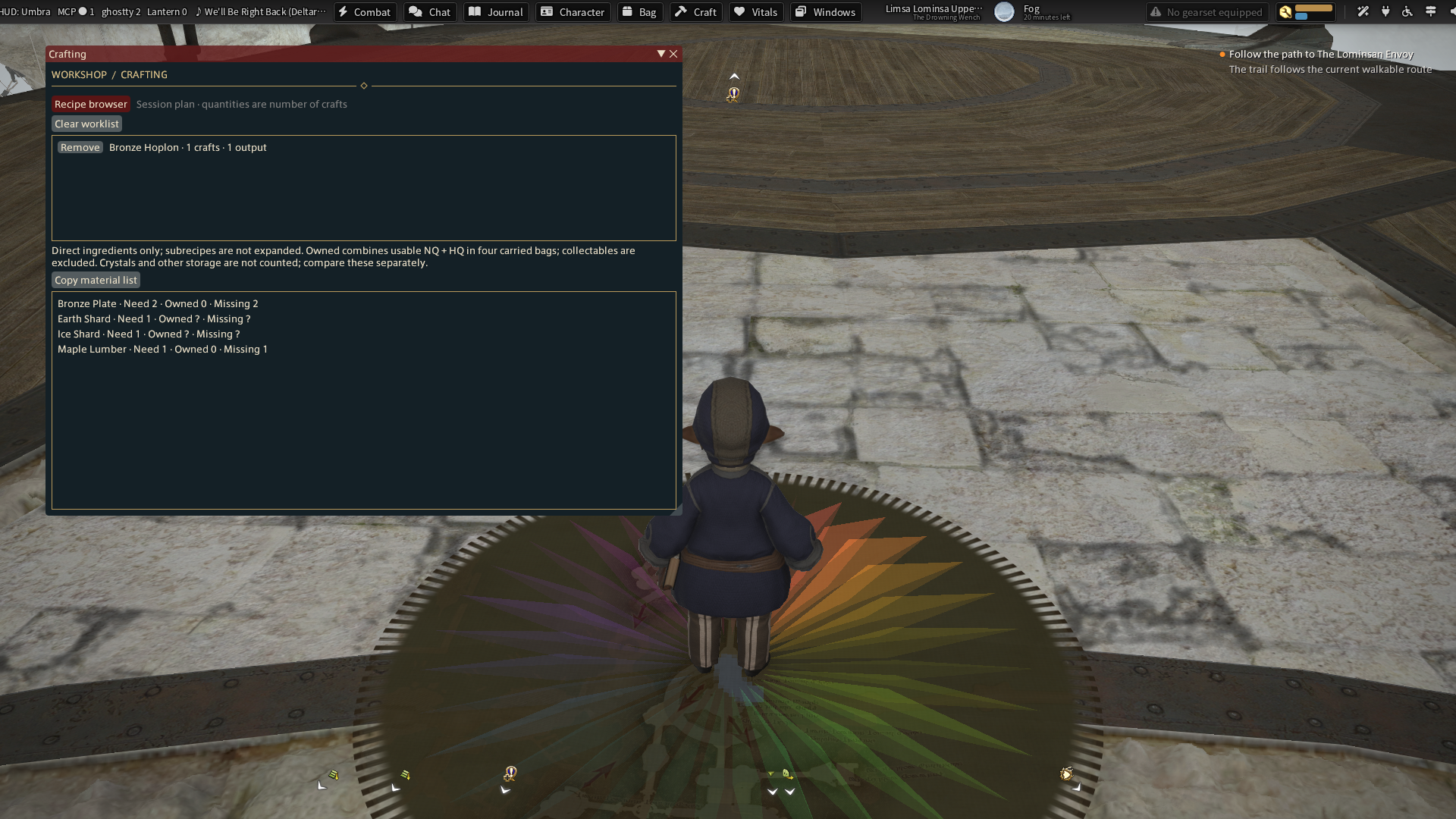
These images are recorded game captures. Captions identify live and sample data; a screenshot does not establish controller or gameplay acceptance.
Umbra UI family · HUD · Journal · Character · Developer libraries and IPC
Releases and next checks
Reviewed . Release availability and live verification are tracked separately.
- development: development · package 0.1.0.1
Offline builds and tests cover the host, content and toolbar adapters. See the recorded screenshots and repository acceptance notes for the live checks and remaining limits.