The bead
Floats 1.5 to 3 yalms ahead at chest height, bobbing and breathing. Dim while you face the right way, brighter as you turn away, so a glance says whether you are on course.
unverified in game
Dalamud plugin · navigation · pointing only
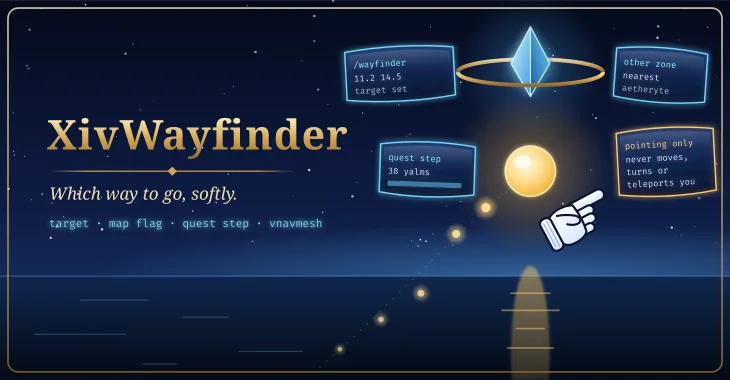
Which way to go, softly
A softly pulsing bead floats a couple of yalms ahead of your character in the direction you need to head, and the game's own white pointing glove points there too, sliding to the edge of the screen when the way lies behind you. It follows a target you set, your map flag or your quest's next step, and with vnavmesh installed it points along the walkable path instead of through walls. It never moves your character.
released · newer guide work remains experimental. The latest testing build passes offline logic, model-pack, shader-checksum and packaging checks. Live rendering, collision, boarding, teleport, controller behavior and navigation handoffs still require acceptance.
Pointing only. XivWayfinder never moves, turns or teleports your character, never presses a key, and never asks vnavmesh to move you. It asks vnavmesh for paths and nothing else.
It follows, in order and each one switchable: a target you or another plugin set (/wayfinder 11.2 14.5, or over IPC), your map flag, and your tracked quest's next step where the game gives it a place. When the target is in another zone it does not point: it names the aetheryte to teleport to, attuned ones first.
Everything below is built and its logic is host-tested; none of it has been observed in game yet.
Floats 1.5 to 3 yalms ahead at chest height, bobbing and breathing. Dim while you face the right way, brighter as you turn away, so a glance says whether you are on course.
unverified in gameThe classic white pointing hand, read at run time from your own game files (ui/uld/Cursor.tex), never shipped. Off screen it slides to the edge and points out, with a little tap. Without that texture it draws an original glove of its own.
/wayfinder minion: the Wind-up Cursor minion's own 3D model, found in your game data by name, floats beside the bead and points along the way, tilting on slopes. It is a model only you see: never a summoned minion, nothing shipped, nothing sent. Not the default.
The map flag, then the tracked quest's next step: the map's own quest markers first, else the quest's to-do locations. Steps with no place (a duty, a cutscene) are skipped.
unverified in game/wayfinder 11.2 14.5, (11.2, 14.5), X: 11.2 Y: 14.5, or with a zone name: 21.5 22.1 central shroud. Reaching it clears it.
A small note above your character: Teleport to the aetheryte nearest the target, attuned ones first. XivWayfinder never teleports you.
unverified in gameWith vnavmesh installed the trail lays its beads and a soft line along the walkable route ahead, not as the crow flies, and the glove points at the path's next stretch. Without a path it is a straight line and says so.
unverified in gameThe trail (on by default), the distance in yalms on hover or always, and a breathing ring when you arrive.
unverified in gameHidden in cutscenes, zone changes, group pose and with the UI hidden; in combat and duties too, unless you say otherwise.
unverified in gameXivWayfinder.v1.SetTarget, SetMapTarget, Clear and GetState, for Ghostty's coordinate links and XivMcp to call. No other plugin calls them yet.
None of this has been done yet. /wayfinder test exists so that it can be, anywhere.
/wayfinder test: the bead 2.2 yalms ahead, dim, the glove above it pointing forward; /wayfinder status says about 20 yalms.Please report what you see, with /wayfinder status and /xllog lines for anything that looks wrong.
Planned shots. Empty frames are placeholders for screenshots and clips that will be captured in game.
Loading the shot list…
Two ways, and both are kept on purpose: one click from the plugin repository, or build it from source and load it as a dev plugin.
Add the repository once; every mod here installs and updates like any other plugin.
https://spacegho.st/mods/ffxiv/plugins.json
/xlsettings → the Experimental tab./xlplugins → All Plugins → search XivWayfinder → Install.XivWayfinder has a stable release, so it shows under All Plugins straight away. Nothing in it has been marked verified in game yet; the changelog says which parts are.
Dalamud will warn you that this is a third-party repository nobody but its author has reviewed. That is true. The repository page says more, including how test builds work.
The dev plugin path: exactly the code in your checkout, no repository, no auto-update. It is how the author runs it, and the honest way to read the code before you trust it.
git clone https://github.com/Spaceghost/xivwayfinder-dalamud
cd xivwayfinder-dalamud
tools/fetch-dalamud.sh && tools/install-dev.shtools/fetch-dalamud.sh fetches Dalamud's reference assemblies. Rebuild after every Dalamud update.tools/install-dev.sh builds Release, stages it outside the checkout, and prints the path (a Z:\… path under Wine). It never edits Dalamud's configuration./xlsettings → Experimental → Dev Plugin Locations → add the path of the built XivWayfinder.dll → + → Save and Close./xlplugins → Dev Tools → Installed Dev Plugins → enable XivWayfinder. Dev plugins are added disabled.If you later switch to the one-click install, disable the dev plugin first so the two copies cannot fight over the same name. The README has the details.
Screenshots of XivWayfinder shared by players. Every one is reviewed by the site owner before it is shown here. Every mod's are in the gallery, and what XivWayfinder should do next is up for a vote.
Loading…
Sharing a screenshot needs a sign-in, so that everything sent to this site comes from an account.
Signing in with FFXIV needs an XIVAuth account and shares no character.
Hide your own name and chat first, and never share a terminal showing tokens or private paths. Metadata is stripped from the image before it is stored. Your upload is linked to your GitHub or XIVAuth account id, which the site owner can see; the public sees only the image and the credit you typed. To have a shot removed, contact the owner through github.com/Spaceghost.
Reviewed . Release availability and live verification are tracked separately.
The latest testing build passes offline logic, model-pack, shader-checksum and packaging checks. Live rendering, collision, boarding, teleport, controller behavior and navigation handoffs still require acceptance.
Voted feature queue · Vote on features · Source and build instructions
Privacy. XivWayfinder talks to nothing on the network and writes nothing but its own settings. It reads the game's own UI files for the glove, the game's sheets for zones, maps and aetherytes, and your journal, flag and map markers from game memory; it changes none of them.
This page is counted, without cookies and without anything that identifies you: what this site counts. It loads nothing from any other site.
Made by Johnneylee Jack Rollins · github.com/Spaceghost. FINAL FANTASY XIV is © SQUARE ENIX; these are unofficial fan plugins and are not endorsed by SQUARE ENIX.