plugin · open source · experimental

XivSpell
Weave words. Keep the world in view.
A native Lua spellbook for FFXIV. Type any spell into Grimoire, weave to a quiet reverse pulse, and choose when your queued runes cast. Edit spellcards in Neovim; optional XivPiano timing follows the music.

development · native free-spelling pulse running in game. Version 0.1.0.5 was built, loaded and shown in game. Automated checks cover free spell branching, whole-word resets, queue editing, pause/resume and agreement between the safe band and timing grades. Controller rhythm input is deferred. No one-click package is published yet.
A spellbook that stays in the world
Words become runes in the Grimoire you already use. Type a spell name, see it join your queue, then decide when to cast. Your character’s view stays open.
Spellstrings adds a quiet timing sigil beside the word entry. An aether pulse contracts into a broad shaded band: the band is the full accepted timing window, and its gold center marks perfect timing.
There is no song-selected spell, falling letter sequence or lane to follow. You choose the spell by spelling it.
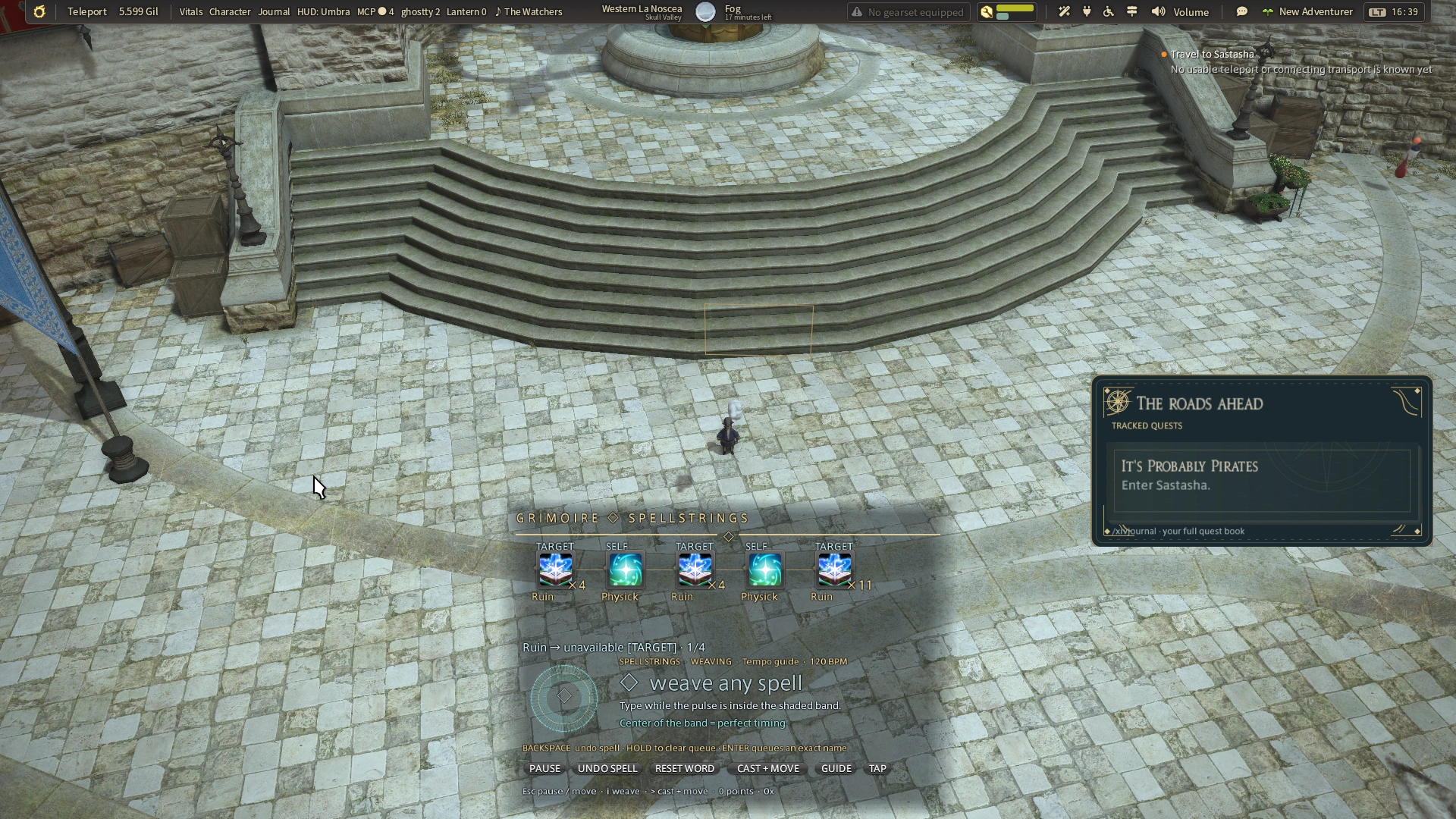
Your next spell is your choice
Begin on any pulse
Start typing any spell in your Lua deck. Each character belongs to a pulse, including spaces inside a multiword name. Until you begin a word, leaving a pulse unplayed is fine.
Keep the whole word together
Matching spell names narrow as you type. A wrong letter, an off-beat character, or a missed pulse during the word restarts it from its first character. Your already-queued runes remain.
Finish it, then keep weaving
A complete, unambiguous name queues one rune. Keep typing your next spell. If a shorter exact name also begins a longer one, press Enter to queue the shorter name, or continue typing.
Choose when to act
> continues casting and returns the keyboard to movement. . repeats the weave. Completing a musical word never casts it automatically.
A few keys, always within reach
| Key | What it does |
|---|---|
| i | Enter or resume weaving. |
| Escape | Pause spelling and take movement control. |
| Backspace | Restart the unfinished word. With an empty word, undo the last queued spell. |
| Hold Backspace | Clear the queued weave. |
| Enter | Queue an exact shorter name when a longer match is also available. |
| > / . | Cast and move / repeat the weave. |
The native Undo Spell, Reset Word and Pause buttons keep the same actions visible. Rhythm input is keyboard-first; controller rhythm spelling is deferred.
Let the music set the moment
With XivPiano and a compatible build, the optional future-song timeline supplies upcoming energy onsets. Piano can provide up to 30 seconds of future timings; XivSpell uses the next timestamp for the pulse you see.
These are measured onsets, not pitch transcription or a guarantee of musical downbeats. If the song map is missing, the interface labels its tempo guide instead.
For a guide alongside game music, use Tap or /xivspell rhythm tempo 120. /xivspell rhythm offset 100 adjusts timing calibration in milliseconds. Quiet optional plucks accompany accepted keys without changing the music’s playback or volume.
The game capture on this page uses the 120 BPM tempo guide. The pulse works without a Pandora account or XivPiano.
Open the spell behind the rune
The spellbook is local Lua source. The starter deck includes Arcanist spells, and a card connects a name, an icon preview, a target and a program.
Hover a queued rune to inspect its source, then click it to open the card in Neovim. The editor has typed Lua completion and explicit saves. Local spellcards can express sequences and hooks; their execution remains separate from musical spelling.
Read the real Ruin card or explore the spellbook guide.
---@type SpellCard
return {
  name = "Ruin",
  action = actions.ruin,
  target = "current",
  phrase = "ruin",
  ---@param ctx SpellContext
  run = function(ctx)
    ctx:cast(actions.ruin)
  end,
}
Start with your own grimoire
Open /xivspell rhythm on to weave with the pulse, or /xivspell rhythm off for normal spell weaving. The rune queue and explicit cast/control transition are shared between the modes.
This is a development build for people comfortable setting up Dalamud dev plugins and a local Lua/Neovim companion. The current screenshots were captured on Linux under Wine. Read the source and setup guide before adapting the host-specific runtime paths.
Install and build
XivSpell is a source-built development plugin. It has no one-click entry in the public plugin repository. Build against your Dalamud references, then add the built DLL under Experimental → Dev Plugin Locations.
git clone https://github.com/Spaceghost/xivspell-dalamud
cd xivspell-dalamud
DALAMUD_HOME=/path/to/Dalamud dotnet build plugin/XivSpell.csproj -c Release -p:RestoreLockedMode=true
tools/play
The local Lua companion is part of the setup. Configure its host/runtime connection using the project guide before weaving; the author’s host and container paths are examples to adapt.
Dalamud API 15, .NET 10 to build, and the local Neovim/Lua companion. Linux/Wine is the recorded live setup. XivPiano is optional.
Build instructions and verification records are in the project README.
Screenshots and captures
These images are recorded game captures. Captions identify live and sample data; a screenshot does not establish controller or gameplay acceptance.
Releases and next checks
Reviewed . Release availability and live verification are tracked separately.
Source build only; no published installer package.
Version 0.1.0.5 was built, loaded and shown in game. Automated checks cover free spell branching, whole-word resets, queue editing, pause/resume and agreement between the safe band and timing grades. Controller rhythm input is deferred. No one-click package is published yet.